ERROR While installing Flash Player:
the user does not have sufficient privileges to install Adobe Flash Player
1- First uninstall Flash Player with this tool: http://helpx.adobe.com/flash-player/kb/uninstall-flash-player-windows.html
2- Then install the latest flash release with your administrator account : http://www.adobe.com/support/flashplayer/downloads.html
more info about Flash Player 11 (Stage3D, molehill etc.): http://www.adobe.com/tr/products/flashplayer.html
May 3, 2012


Apr 20, 2012
Why Linux?
Microsoft has reached an enormous success with its Windows product during the last decade and practically monopolized the market for home computer operating systems. But, does it mean Windows is still the best OS around, especially for power users?No, it’s not. At least not always. And on this page you are going to see why.
Summary
If we draw a comparison between the two operating systems considering licensing, selling, and upgrading models, and if we add the supreme configurability (resulting from the system’s philosophy), and a low pricing then it will appear the GNU/Linux is decidedly more user friendly in terms of software then any other system existing on the market at present (perhaps apart from niche systems like GNU/Hurd and Haiku).
Microsoft Windows systems are still dug in on the other pole with their restricted licensing allowing users to — at the most — conditionally run the systems (not even in every case) and their applications.
By friendliness we mean something more general that the ease-of-use and availability of applications! It is about not constraining the users but granting them full freedom to exert their rights to use software in their own way. It is about a freedom of choice — the possibility to use any window manager, any file system, and any package system the user wants to choose, about the possibility to work in a console or GUI environment, locally or remotely. It’s all about the security schema, well designed and overt, instead of “security by obscurity” model which has been compromised over and over. Do the users need such freedom? Certainly 90% PC users will do well without it. For the remaining 10%, including me, the GNU/Linux systems have appeared to be the only solution.
Why Linux? Why do most web hosting companies use Linux as their primary platform for their servers? The answer is simple: security, stabilty and speed!
Read 10 reasons to choose Linux
- Security — why are the default security settings of Windows XP so bad?
- Desktop usability — what is wrong with Windows’ usability and how it is corrected in GNU/Linux desktops?
- Installing software — ok, you thought it can’t be easier than double-clicking the
setup.exefile? Think again! - Upgrading — ever thought that upgrading your system and all its appliactions could be as executing one single command? No? Well, GNU/Linux is exactly this way.
- System crashes — every desktop crashes, but how to get over it?
- Performance — is Linux really that much faster than Windows? Well… it is.
- The power of console — learn how to improve your productivity by using the terminal
- Remote access in GNU/Linux — how to connect remotely to your Linux box
- Philosophy and licencing of Linux — how does it differ from the proprietary software?
- Cost and TCO of Linux — what is cheaper — Linux or Windows?
Reference: http://polishlinux.org/why-linux/
The Linux Command Line - Review
 was given an opportunity to review The Linux Command Line, a Complete Introduction, by William E. Shotts, JR from No Starch Press
and decided to give it a go. Being somewhat of a command line geek, I’m
always on the lookout for good material to learn new and interesting
things, and perhaps recommend to others. This is one of the better books
I’ve read on the Linux Command line. It is easy to read and users with a
little experience will find it has straight forward descriptions and
examples. The book contains a lot of information and the only thing I’ve
found lacking is diagrams, but if you’re not a particularly visual
learner, this may work for you.
was given an opportunity to review The Linux Command Line, a Complete Introduction, by William E. Shotts, JR from No Starch Press
and decided to give it a go. Being somewhat of a command line geek, I’m
always on the lookout for good material to learn new and interesting
things, and perhaps recommend to others. This is one of the better books
I’ve read on the Linux Command line. It is easy to read and users with a
little experience will find it has straight forward descriptions and
examples. The book contains a lot of information and the only thing I’ve
found lacking is diagrams, but if you’re not a particularly visual
learner, this may work for you.If you’re new to the Linux command line you’ll walk away knowing what it is capable of; how to do all kinds of stuff that the “experts” do on a daily basis and probably more. For example, I can’t remember the last time I printed something from the shell. There is so much information contained within this book, you’re almost guaranteed to learn something, I did.
Welcome to Yogurtistan!
A 3D shopping universe inside Facebook | VentureBeat:
check this out :http://venturebeat.com/2012/04/19/welcome-to-yogurtistan-a-3d-shopping-universe-inside-facebook/#s:yogurtistan-0018

Yogurtistan is a 3D world aimed at simulating real-world retail environments for e-commerce companies on Facebook. With this technology, retailers can create 3D environments where customers can make custom avatars, try on virtual clothing, interact with one another online, and make purchases.
It’s built on Adobe’s Flash player version 11.2, and is accessible to users on Windows PCs, Macs, and tablets (via an Air 3.2 app). It’s also integrated into Facebook.
“We are creating a new experience by mimicking real-life engagement by going from store to store without changing a tab, or entering the web site address of the store,” said Yogurt AS chief executive Cemil Turun (pictured below), in a press release. “This is one centralized system. I can run into a promotion, a friend, or simply begin to chat with a stranger in the street, all of which is accessible on any browser or even an iPad.”
Yogurt presented its new 3D world today at the DEMO Spring 2012 conference in Santa Clara, Calif.
Currently, Yogurtistan is a small, retail-focused universe with just one plaza. On that plaza are several stores, including Migros, which is Turkey’s largest supermarket chain, and Quiksilver, a global clothing brand for surf, snow, and skate enthusiasts. Other Turkish and international brands building presences in Yogurtistan include TheFirstClub (an online games, books and music site, based in London), BiggShop, Aral, Oxxo, iddaa (online betting) , Tefal (a French kitchenware brand), Swissotel, Yummy Cupcakes, Magic Form, Fenerium, Intema, and Babylon Jazz Club.
To set up shop in the universe, retailers first need to create a storefront, using industry-standard 3D editing tools, such as 3D Max, Softimage XSI, AutoCad, or Maya. Yogurt AS provides guidance about how many polygons the files should use and the kinds of texture files needed. Once the retailer delivers a 3D file to Yogurt AS, the company converts it and annexes it to Yogurtistan, then delivers an Adobe Flash file (.SWF) that the retailer can embed in a website or Facebook page.
There’s no upfront fee for the service, but Yogurt AS charges a percentage of the transactions made in Yogurtistan. The amount varies, but currently runs about 10-to-15 percent for apparel retailers. Yogurt also provides CRM tools for engaging customers.
As a bonus, real-world apparel brands can cash in on the craze for virtual goods, because they can sell virtual clothing for customers avatars within Yogurtistan.
An additional attraction, Cemil said, is that “It is very cool to have a virtual 3D store.”
Cemil started out as a programmer and 3D animator in the 1990s, then founded Yogurt technologies in 1997, providing corporate customers with 3D development as well as making games. In 2007, he pulled together a team of former colleagues to build an open-source 3D engine, which now forms the basis of Yogurtistan.
Yogurtistan is currently in private beta.
The parent company, Yogurt AS, is based in Instanbul, Turkey. It has 20 employees and has raised a total of $3.8 million in funding to date, led by Golden Horn Ventures.
“Ecommerce in Turkey is really taking off,” said Menlo Ventures managing partner Shervin Pishevar said in the judging panel following the startup’s DEMO presentation. I can see it being popular there and… expanding to other markets, but I’m not sure U.S. consumers will shop in that way — yet.”
Yogurt AS is one of 80 companies chosen by VentureBeat to launch at the DEMO Spring 2012 event taking place this week in Silicon Valley. After we make our selections, the chosen companies pay a fee to present. Our coverage of them remains objective.
http://www.yogurtistan.com/
https://apps.facebook.com/yogurtistan/
Nov 5, 2011
Guidelines for creating good open source software
There are 19 guidelines for creating good open source software listed in his essay:
- Every good work of software starts by scratching a developer's personal itch.
- Good programmers know what to write. Great ones know what to rewrite (and reuse).
- Plan to throw one away; you will, anyhow.
- If you have the right attitude, interesting problems will find you.
- When you lose interest in a program, your last duty to it is to hand it off to a competent successor.
- Treating your users as co-developers is your least-hassle route to rapid code improvement and effective debugging.
- Release early. Release often. And listen to your customers.
- Given a large enough beta-tester and co-developer base, almost every problem will be characterized quickly and the fix obvious to someone.
- Smart data structures and dumb code works a lot better than the other way around.
- If you treat your beta-testers as if they're your most valuable resource, they will respond by becoming your most valuable resource.
- The next best thing to having good ideas is recognizing good ideas from your users. Sometimes the latter is better.
- Often, the most striking and innovative solutions come from realizing that your concept of the problem was wrong.
- Perfection (in design) is achieved not when there is nothing more to add, but rather when there is nothing more to take away.
- Any tool should be useful in the expected way, but a truly great tool lends itself to uses you never expected.
- When writing gateway software of any kind, take pains to disturb the data stream as little as possible—and never throw away information unless the recipient forces you to!
- When your language is nowhere near Turing-complete, syntactic sugar can be your friend.
- A security system is only as secure as its secret. Beware of pseudo-secrets.
- To solve an interesting problem, start by finding a problem that is interesting to you.
- Provided the development coordinator has a communications medium at least as good as the Internet, and knows how to lead without coercion, many heads are inevitably better than one.
Jul 12, 2011
Pixel Bender error: unable to resolve your pbj file for transcoding
You should export the pixel bender kernel into pixel bender bytecode file in order to embed in your flex project.
Jun 28, 2011
Yahoo Mail POP access
FOR THOSE OF YOU you with Yahoo Mail non-premium accounts, you must be homesick for those days when your free Yahoo webmail had POP access and mail forwarding.
Since December 2010, those two functions are available only to premium (i.e. paid) account holders, as The Naked Listener wrote in back in 7 January.
Since then, I’ve been reliably informed (and reliably tested) a POP/forwarding workaround. The tactic is to set your account to the Philippine region. The U.S. and all of the European regions don’t work.
Setting your Yahoo Mail to the Philippines makes for little if any impact on usability and navigation because Philippine regional content are entirely in English.
CONFIGURATION
1. Log into your Yahoo Mail in the usual way.
2. Click “Options” (or “Mail Options” as the case may be) somewhere on the top right corner of the main Yahoo Mail interface.
3. A dropdown menu appears. Click “Mail Options.”
4. On the left panel, click “Account Information” and you’ll be asked for your password again.
5. Your Account Info screen comes up now.
6. Scroll down to “Account Settings” section and click “Set language, site, time zone.”
7. In “Regional Site and Language,” set it to “Yahoo! Philippines” and click “Save.” (Leave the dropdown menu “Time Zone” underneath unchanged.)
8. Return to the main Yahoo Mail interface the normal way (or just type http://mail.yahoo.com in your browser to do that).
9. Go back to “Options” (or “Mail Options”) somewhere on the top right corner.
10. On the left panel, click “POP & Forwarding” and choose below:
- EITHER “Allow your Yahoo! Mail to be POPed“
- OR “Forward your Yahoo! Mail“
and click “Save changes” button on the top bar.
TEST
11. In Yahoo Mail, compose and send a test email to yourself (at Yahoo and at your other email address). The test email should arrive in both places.
12. In your other email, compose and send another test email to yourself (just to Yahoo this time). That test email should arrive in both places.
13. That’s it!
NOTE
14. It seems this workaround works for free Yahoo Mail accounts that are 10+ years old. You should still try it out regardless of how young or old your account is.
15. This workaround doesn’t work with non-English regional options, such as Japan, Taiwan, etc.
16. Circulate this workaround out of the limelight, or else Yahoo will wise up and plug this loophole.
17. As always with workarounds, your mileage may vary.
Reference:
Subscribe to:
Posts (Atom)
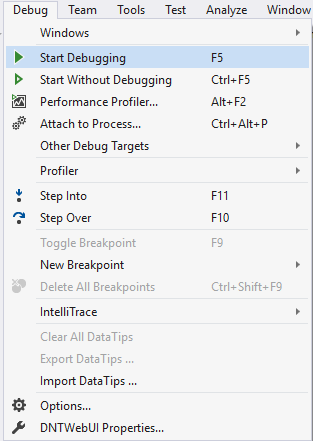
Visual Studio Keyboard Shortcuts
Playing with keyboard shortcuts is very interesting and reduce the headache of using the mouse again and again while programming with visu...
-
Delete: /YOUR PATH TO WORKSPACE/.metadata/.plugins/org.eclipse.core.resources
-
Unity NavMesh vs Apex Path vs A* Pathfinding Project Update June 2017: Unity 5.6 comes with improved NavMeshes! They are now component-b...
-
Playing with keyboard shortcuts is very interesting and reduce the headache of using the mouse again and again while programming with visu...

